

Fencebound began with ideas mostly from my daughter. I turned those ideas into requests in a conversation with the assistant I call dot: a little cat, an outing, trouble along the fences, and a reason to keep going.
The result is a playable browser game. The cat can dodge a returning fox, meet friendly cats, cross roads with a different control scheme, ride a capybara, climb toward home and finally put down its tuna for dinner. Getting there took repeated conversations, implementation, checks and repairs.
Play Fencebound in your browser →
No sign-in is needed for the public game. Open it full-page on a phone. Use Space or tap to jump, a second press for the air boost, and X or Slash for scratching. Sound starts muted; select the speaker button when you want audio. The later road section switches explicitly to arrows, WASD or direction buttons.
This is a build log about that process. It is also about the difference between a feature being in the code, being visible to a player and working well enough to enjoy.
The conversation became the design brief
The useful requests got specific. An early encounter should not disappear after one jump: the fox should turn around and rush back several times. Friendly cats should enter visibly and follow for a useful stretch. Pots outside a house should be harmless to break, but provoke the person in the corresponding window. Dangerous cactus barriers should look different from those pots.
Those are examples from the development conversation, paraphrased here rather than presented as quotes from my daughter. Her creative contribution was the starting point; I am not assigning each individual mechanic to her.
As the game grew, feedback changed it again. An enemy could be too easy; a later version could become too crowded. A railing needed to provide a real defensive route. A friend arriving for a healing scene needed to approach on screen instead of appearing beside the player. The work was turning those observations into changes that could be seen and checked.
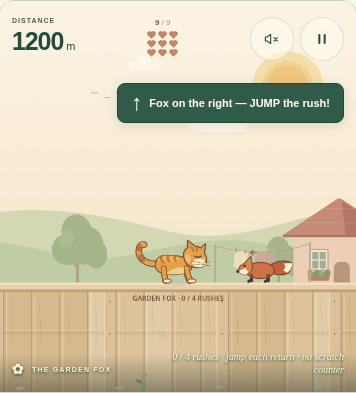
Earlier development screenshot: the fox encounter was designed around repeated passes, not a single jump.
The road-crossing chapter is there—and easy to miss
The runner eventually reaches a fisherman and a tuna gift. Then the controls change. Movement waits at a safe starting point until the player selects Begin crossing. Arrows, WASD or four direction buttons move the cat one step at a time through traffic.
There are three short boards: Seaside Access, Highway Island and Forest Service Road. Each has traffic warnings and a safe middle checkpoint. After the capybara ride, a separate woodland road leads toward the climb home. These are road crossings near different environments; a river with moving logs is not implemented.
This chapter sits late in the game. The recorded browser checks used declared starting checkpoints and then normal game controls. They establish specific transitions and interactions, not that a new player completed the entire journey naturally. A short demonstration should show the crossings explicitly rather than leave viewers to discover them after a long run.
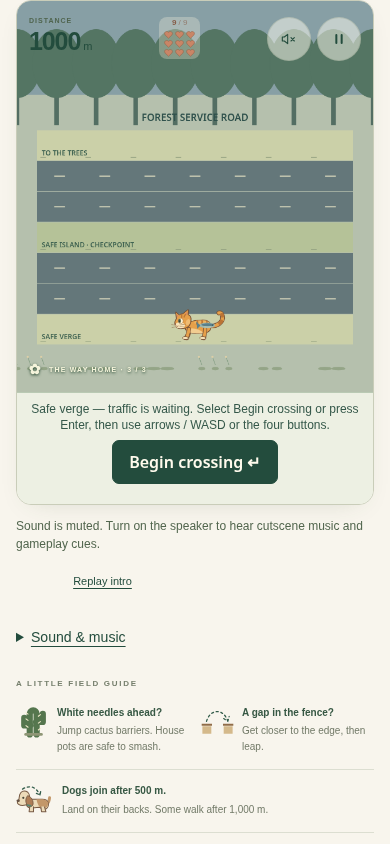
Retained v20 hosted screenshot from a declared checkpoint. It shows the directional road chapter, not an uninterrupted full-game playthrough.
An outside look found problems that code checks had missed
Terra’s local computer-use review found three practical issues. The focused game still described runner controls during a crossing. The small safe-verge and checkpoint labels were hard to read in portrait. A heart-loss message overlapped the painted road title.
We implemented the corrections in version 24. The accessible instructions now follow the control mode, readable landmark text sits beside the controls, and road damage feedback stays clear of the title. Independent Terra source review caught repeated updates to the screen-reader status text; those were corrected before release. An initial browser check also caught a CSS rule shrinking the replacement text back to 12 pixels.
Terra’s contribution was finding and reviewing bounded problems, not proving every battle felt right. Its sparse combat snapshots could not reliably align a key press, an impact and a lost heart. That evidence did not justify a hitbox diagnosis.
The latest combat change makes a late press count
Version 25 adds a small recovery-window input buffer. If a grounded player presses scratch in the final 120 milliseconds of the existing cooldown while the Captain, an alley cat or the later rival is already vulnerable, one counter scratch can wait until the cooldown finishes.
It stays tied to that opponent and that opening. Jumping, damage, pause or leaving the scene cancels it. It does not shorten the cooldown, turn an early scratch into a parry or let one activation drain a multi-hit enemy. The button shows Queue and Queued, so the same opportunity is available through keyboard, pointer and emulated-touch controls.
The final qualification recorded 26 focused mechanics checks, 19 harness-isolation checks and three automated keyboard/touch/pause browser cases, with independent review. The deployed files matched the reviewed source and an ordinary authenticated startup passed. The battles themselves were checked locally from declared checkpoints. These results leave human combat feel, physical-phone use and listening outside the reported acceptance.
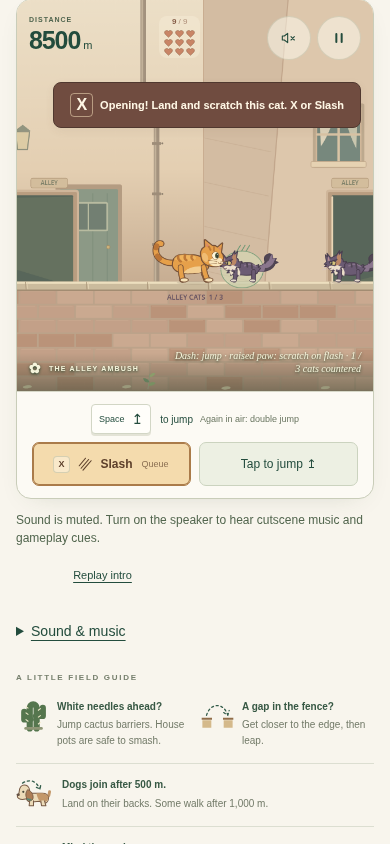
Version 25 local automated touch-emulation check. The button exposes the short input-buffer opportunity.
What this example does—and does not—show
| Delivered | Remaining qualification or scope |
|---|---|
| A playable cat runner with changing scenes, enemies, music and a return-home ending | Human enjoyment and complete natural-run acceptance are not established by the cited automated checks |
| Directional traffic crossings and a woodland spur | No river/log-hopping mechanic; no public chapter-selection shortcut |
| Version 24 accessibility and feedback corrections; version 25 counter buffering | Physical phones, screen-reader hardware and listening remain unverified in this evidence |
| A public playable build, opened for this demonstration | The source repository remains private; this is an ongoing prototype |
The public Fencebound demo is version 25. Its access was opened for this demonstration; the development repository and detailed release records remain private. The recorded verification summary separates local combat checks from hosted startup and public-access checks.
For me, the useful pattern was a conversation that kept returning to observable details: what the cat should do, what actually happened, and what to check next. My daughter’s ideas gave the game its direction. The conversation helped turn that direction into something playable—and the testing kept revealing what still needed work.