Google Flow turns a visual idea into a short video shot. Before your first attempt:
- Make: a product concept, storyboard, background clip or animated illustration. Start with one useful shot.
- Try: Google’s credit guide describes 50 daily credits without a subscription, while its eligibility help requires a subscription. Check the access conditions and what your account offers first.
- Budget: check the model’s per-output quote, output count and retry ceiling before generating. A completed clip you dislike is not necessarily refundable.
- Watch out: references do not guarantee continuity, readable text or synchronized speech. Review upload and sharing conditions before submitting images.
Updated 11 October 2026: access, credits, controls and privacy were checked against official documentation. The five hands-on generations below remain the original 19–20 February 2026 evidence. No generation, account check or replay was run for this update. The original publication date and February share artwork are preserved.
What is Google Flow?
Flow is Google’s creator application; Veo is a video-model family inside it. A project holds references and generated assets. Scenebuilder lets you arrange and trim clips into a sequence. A longer finished video can be assembled from short shots; it need not be one generation.
Choose the service before comparing its allowance:
- Flow website: projects, frames, reference Ingredients and scene assembly. Use Flow credits, model settings and the Flow privacy notice.
- Gemini Apps: conversational video creation/editing. Its current video guide names Gemini Omni; personal accounts need a Google AI plan, or a qualifying Workspace license for work/school accounts.
- AI Studio / Gemini API: developer integration and programmatic Veo requests. API billing, model IDs, limits and data terms apply; a Flow balance is not an API allowance.
- Google Cloud: a separately configured Cloud video workflow, with Cloud billing and contracts rather than consumer Flow protections.
See Gemini Apps video help, Gemini API Veo documentation and Cloud video documentation. This guide’s workflow uses Flow’s website.
Flow’s getting-started page requires age verification at 18+, a supported region and a subscription, with qualifying Workspace access also listed. Its credit guide explicitly describes non-subscriber access. These pages disagree on the subscription requirement. Check regional availability and the options actually offered to your account before subscribing; no account eligibility was tested here.
For other AI tasks, the maintained free-resource directory distinguishes free clients, limited allowances and restricted trials.
Choose the input, then the model
- Text to Video: build a scene from a description.
- Frames to Video: supply a first frame, optionally a last frame, and describe the motion between them. Choose this when the starting composition matters.
- Ingredients / References to Video: supply subject, object or style references and explain each reference’s role. This differs from fixing the first frame.
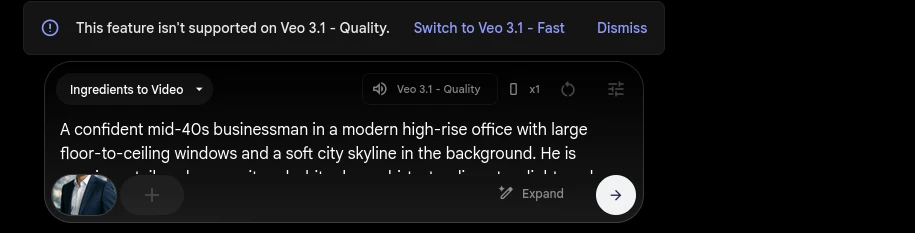
The current feature matrix lists Veo 3.1 Lite, Fast and Quality, plus Gemini Omni Flash 1.1. Lite/Fast offer 4-, 6- and 8-second text/frame shots; their Ingredients shots are 8 seconds. Quality does not support Ingredients in that matrix. Omni supports reference-based video editing and 10-second shots; its voice controls are not universal Veo controls.
For a first attempt, choose an available lower-cost model supporting your input. Quality’s price alone does not establish that it will solve your shot. Two documentation conflicts remain: Quality lengths are 4/6/8 seconds in the matrix but 8 seconds in the credit table; extension is Lite-only in the matrix while pricing also lists Fast/Quality extension. Use the displayed model/options, not an assumed duration or extension recipe.
What credits actually buy
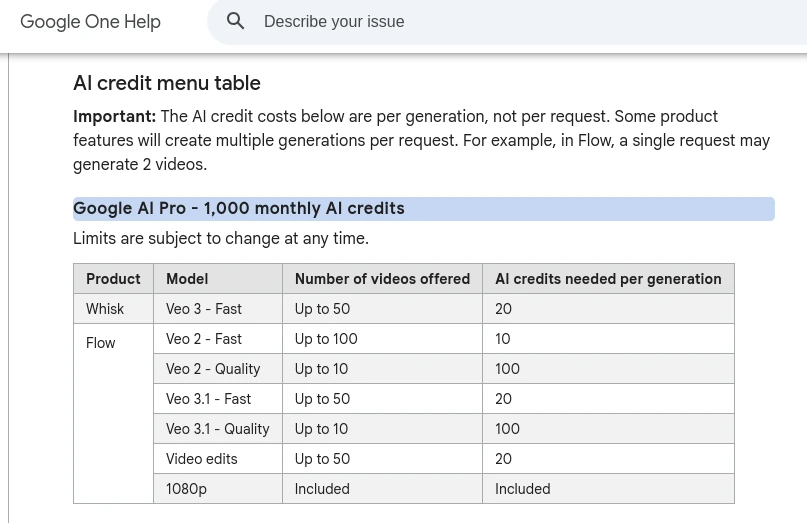
Google’s Flow credit guide documents 50 daily credits, with monthly extras of 200 Plus, 1,000 Pro, or 10,000/25,000 Ultra, depending on the Ultra plan. Daily refresh is triggered by the first generation; a midnight reset is not specified. Monthly credits refresh at the billing-cycle start. Neither daily nor monthly unused credits roll over. Balance is documented under your profile picture.
| Veo model | Non-Ultra subscribers: credits/output | Ultra subscribers: credits/output |
|---|---|---|
| 3.1 Lite | 10 | 5 |
| 3.1 Fast | 20 | 10 |
| 3.1 Quality | 100 | 100 |
The same credit guide separately lists lower-priority Lite at zero credits for Ultra subscribers and Ultra family plan managers; Ultra family members and non-Ultra subscribers cannot use that mode. This is a paid-plan option, not a no-subscription entitlement.
These are per-output rates, not per prompt. The Lite/Fast wording does not establish every free account’s eligibility. Omni has separate duration/resolution rates; check Settings for the actual quote. Non-subscriber video access can be restricted around 14:00–17:00 UTC.
Worked budget, conditional on a displayed 20-credit quote: 50 credits fund two outputs, leaving 10. A two-output request costs 40. That is not “2.5 videos per day,” and neither output is guaranteed usable. Count attempts, then cost per accepted shot; see the cost-saving playbook.
Getting-started help says failed generations are not charged; it specifically describes refunds for audio-generation failures. A completed clip you dislike is not necessarily a failed generation.
Top-up guidance also conflicts: Flow’s page includes Plus, but the dedicated Google One purchase page says Pro/Ultra only, excluding Plus and Japan. Use that narrower purchase rule until reconciled. Within a Google One family group, only the plan manager can purchase top-ups. Purchased AI credits may expire on the terms shown when acquired; check those terms and any auto-reload setting before buying.
Upscaling is separate from native output: the credit guide lists 1080p at zero credits for Plus/Pro/Ultra, and 4K at 50 for Ultra only. February’s GIF/720p exports below are historical observations, not today’s universal limits.
One reusable shot
Before uploading: use an image you own or are authorized to submit, without confidential material or unconsented likenesses. Review Flow’s privacy and sharing conditions, including improvement use and human review, before submitting it.
- Start a Flow project and choose Video → Frames in the standard prompt box. Add your approved landscape as the start frame.
- Select an available model supporting that mode. Set aspect ratio, generation length and number of outputs in the actual controls; start with one output. For the five-second usable segment below, choose six or eight seconds if offered. If you choose four seconds, shorten the acceptance target before generating. Record the selected model, resolution and per-output quote, then calculate the total. Set a maximum number of outputs you can afford, including retries.
- For a silent shot, turn on Return silent videos in project Settings; Sound on hover only changes playback. Describe one action that complements the image and define acceptance before spending credits.
This compact template is an untested directing example, not a Google schema:
| |
The Flow creation guide documents frames, Ingredients, model, aspect ratio, length and output-count selection. For Ingredients instead, identify which approved asset supplies the subject and which supplies the setting; clean subject references on plain backgrounds help avoid contradictory guidance. Camera wording is a direction in the prompt, not a verified dedicated camera-lock switch. No separate website negative-prompt field was verified; naming one in a brief does not create a control.
Recheck the active model, per-output quote and output count, then click Generate once. For the returned asset, use More → Download, select the file type and inspect the downloaded resolution. Trim the accepted segment in Scenebuilder or an editor.
Play the whole clip. Inspect continuity, anatomy, flicker, unwanted movement and text; for dialogue, inspect intelligibility and lip alignment. Change one prompt detail or reference after diagnosing the failure, within your chosen attempt ceiling. References and detailed briefs do not guarantee identity, exact cuts, latency or audio synchronization. Add essential text and precise sound timing in an editor. A still image with simple editor animation may already meet the brief.
Privacy, uploads and publication
The Flow Privacy Notice, effective 19 May 2026, covers interactions, uploads and generated output used for improvement, with sampled human review. Help improve Flow can be switched off in the main menu. Prompts, uploads, projects and outputs normally remain until deleted; Agent/Tools sessions default to 18 months. Separately held reviewed data can remain up to 18 months despite deletion or opt-out. Deleted account data may remain for up to 72 hours; Agent/Tools outputs and sessions require separate deletion. These are documented conditions, not deletion behavior tested by us.
Sharing help says anyone with a share link can find/use the creation; Include inputs also exposes the ingredients. Stopping sharing requires deleting the original creation. The Flow notice explicitly says not to submit confidential information or material you would not want reviewers to see or Google to use for improvement. Flow’s setting does not confer Cloud/API confidentiality. Gemini API terms distinguish unpaid and qualifying paid/billing contexts, including regional exceptions; a consumer subscription alone does not establish paid API data treatment. Cloud service terms apply to the separate Cloud route.
Flow’s watermark and usage FAQ says outputs include invisible SynthID. Visible watermarking is configurable but automatic in India, South Korea and Vietnam. The regional restrictions make uploaded-video editing unavailable in the EEA, Switzerland and UK. Editing identifiable minors in uploaded videos and generating videos of prominent people are unsupported in every region. Other safety restrictions can also block requests. Google’s statement that it does not claim ownership of generated content is not third-party rights clearance or a copyright guarantee. Check the applicable Google Terms and Prohibited Use Policy, input permissions and the destination’s disclosure rules before publishing. The Freepik credits in our old bag example are attribution, not proof of permission for a new upload.
Historical results: February 2026
The original report recorded five generations on a no-membership account using Veo 3.1 Fast. The retained files below show the businessman, bag and hacker-workspace clips; the bag notes describe two attempts, including an extra-arm failure. This is an illustrative field report, not a complete five-output benchmark or a current model comparison. No missing attempt-level record has been reconstructed.
The February account showed a 20-credit quote, blocked Quality access and no visible free balance. Those observations do not override today’s documentation. Old prompts are preserved verbatim: their timestamped cuts, aspect-ratio lists, overlay text and lip-sync requests are requests, not verified controls or guarantees.
The original project screens:
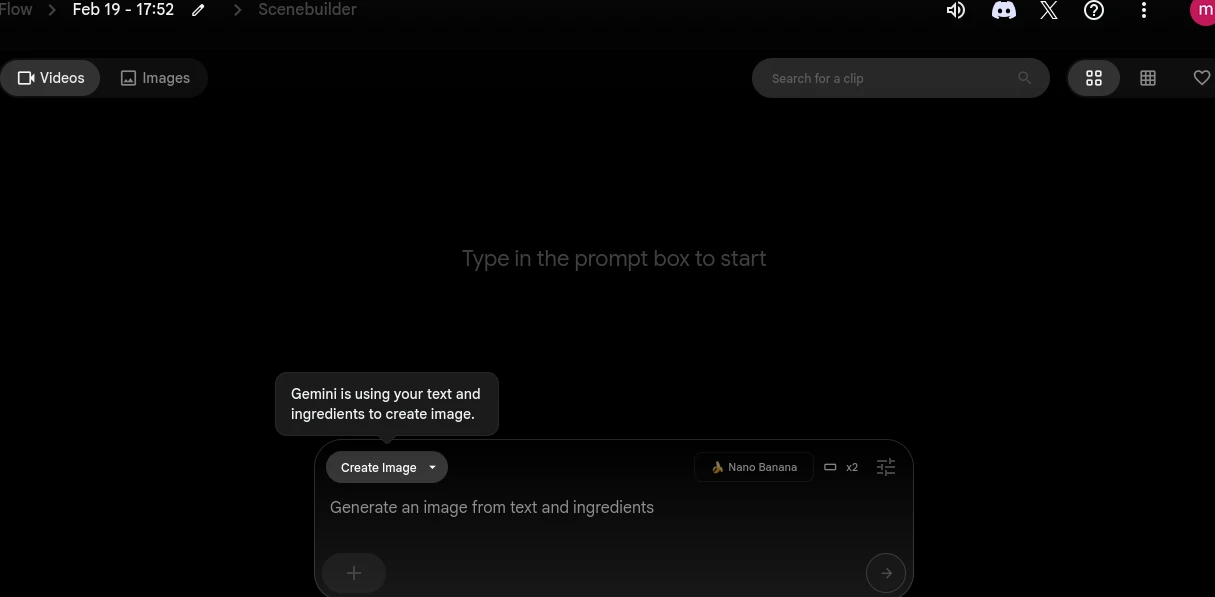
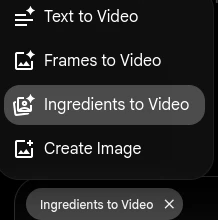
Example 1: Professional business clip
The February test began with a ChatGPT-generated image, then used it as a video reference.
Step 1: Generate the source image
The resulting source image:

Step 2: Check your constraints first
The February settings screen showed the quote used for this test:
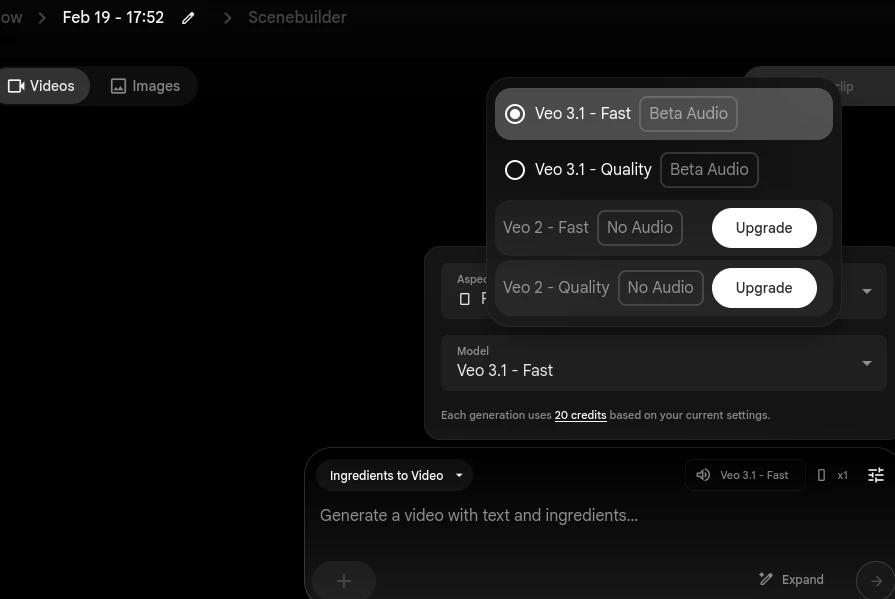
The old report attributed a 50-credit daily allowance and midnight reset to the free tier. This update corrects the reset claim and universal rate; the old account screens remain below as dated evidence.
February expander and aspect-ratio options:
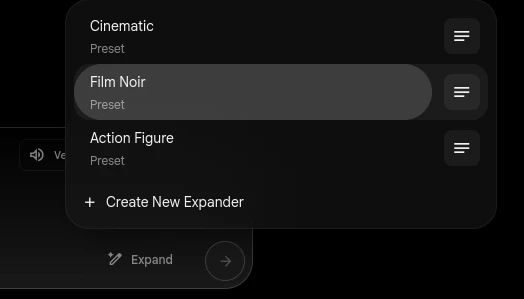
The original brief requested 6–8 seconds; this is not today’s duration documentation.
Step 3: Write and optimize the video prompt
Goal: a 6–8 second clip of the businessman saying “Stay informed about regulatory changes, stay compliant.”
Step 4: Generate
On the February no-membership account, the Quality attempt was blocked. The test continued with Fast. This is historical account evidence, not a universal current access rule.
Veo 3.1 Fast result — 720p video, loaded only when you choose to play it:
The original author considered this clip usable, with editing still helpful. No blind quality or audio-alignment evaluation was recorded.
Example 2: Product advertisement
The bag experiment used two reference photos — the model and product — plus a ChatGPT brief. Their Freepik attribution is retained; new upload permission is not established here.


The brief
The original brief-generator prompt follows verbatim. Its detailed shot list illustrates what was requested, not what Flow reliably executed:
ChatGPT’s output for the bag example:
Results
The retained result from two generations:
Example 3: Text-to-video
The February text-only prompt, preserved verbatim:
A dimly lit hacker workspace with a glowing ultrawide monitor filled with a terminal UI,
code streaming rapidly. Close-up of hands typing, reflections of green monospace text
in glasses. Smash cut to a clean text prompt on screen: "launch product demo video".
Instantly the screen renders a polished cinematic product clip in a preview window.
Quick over-the-shoulder shot: the developer smirks, hits enter, a progress bar
completes in milliseconds. Final shot: multiple video thumbnails auto-generating
in a grid, terminal text overlay: "text → video → shipped". Subtle camera push-in,
moody lighting, cyberpunk color grading.This retained clip illustrates a concept/b-roll use case. The prompt’s “milliseconds” describes an imagined scene, not measured generation latency.
Verdict
The February clips show useful visual ideas alongside garbled text and anatomy errors. They do not prove that an LLM-written brief improves quality, that GIFs look less generated, or that a fixed number of retries yields a usable shot. The practical choice today is to match the input mode to one clear action, check the quote, and inspect the whole output before editing or publishing.
Sources and related links
Official documents checked 11 October 2026; model access, prices and options may change. The relevant primary source is linked beside each current claim. Start with Flow credits, model support, creation controls and the Flow Privacy Notice. Conflicting help-page wording remains qualified above; no account or export test accompanied this review.
- Cost-saving playbook — budget for retries and cost per usable result.
- Honest AI limitations — broader failure patterns and human review.
- Lyria music routes and field notes — current Gemini/Flow Music/API documentation, with eight separate February audio generations.